Why Intellections Script is Your Go-To for Handwritten Elegance
There’s a particular challenge in digital design that many of us face: how do you inject genuine warmth and a human touch into a project that’s being built on a screen? You can have the perfect color palette and a flawless layout, but sometimes the final piece still feels a bit sterile, a bit too polished. This is where the choice of typeface becomes critical, not just for conveying words, but for conveying feeling. A well-chosen script font can bridge that gap, transforming digital assets into something that feels personal and crafted. This is precisely the space where Intellections Script excels, offering a solution that is both stylish and deeply elegant.
The Anatomy of Elegance: What Makes Intellections Script Tick
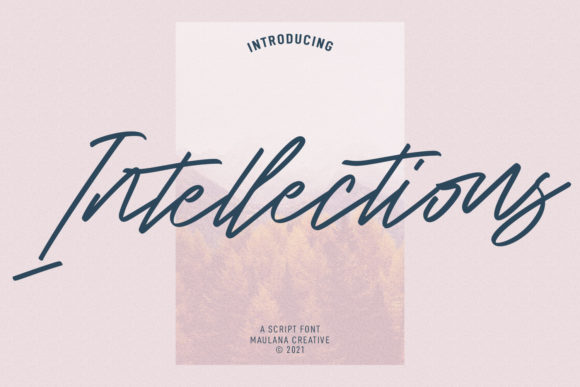
At first glance, Intellections Script presents itself as a fluid, connected handwritten font. But to call it just another script would be to overlook its nuanced design. It’s a premium font that balances a classic calligraphic flow with a distinctly modern sensibility. The letterforms have a graceful, sweeping motion, with delicate swashes and a natural baseline that avoids the rigid uniformity of many digital scripts. This isn't about mimicking a hurried note; it's about emulating the careful, practiced hand of a skilled calligrapher.
The personality of the typeface is one of refined confidence. It doesn’t shout for attention with overly ornate loops or distracting frills. Instead, its elegance comes from its consistency and rhythm. The connections between letters feel intuitive, and the varying stroke widths provide a subtle visual interest that keeps the eye engaged. When you use Intellections Script, you’re not just applying a font; you’re adopting a specific tone—one of sophistication, care, and thoughtful intention. It’s this quality that makes it a standout creative font for designers seeking to elevate a project beyond the ordinary.
Practical Applications: From Wedding Invitations to Brand Identities
The true test of any typeface is its versatility. Where does a font like this actually work in the real world? The strength of Intellections Script lies in its ability to adapt to a wide range of contexts while maintaining its core character. Let’s break down some of the most effective applications.
Personal Touches and Celebratory Design
This is the font’s natural habitat. For wedding invitations, thank you cards, and greeting cards, the elegant handwritten style is perfect. It immediately sets a tone of intimacy and celebration. Imagine a save-the-date where the couple’s names are rendered in Intellections Script—it feels personal and special. The same applies to quotes for social media graphics or inspirational prints. The font adds a layer of authenticity that a standard serif or sans serif font simply can’t replicate.
Commercial and Branding Projects
Here’s where its use requires more strategic thought, but the payoff can be significant. For logo design, Intellections Script can be a powerful tool for brands that want to communicate approachability, craftsmanship, or luxury. Think of a boutique bakery, a high-end florist, a custom stationer, or a personal brand coach. The font can serve as the primary wordmark or as a complementary element in a larger logo lockup. Its elegance lends itself well to packaging design, especially for products where the story and the maker’s touch are part of the appeal.
In editorial design and web design, it shines as a display element. Use it for pull quotes, article headers, or section titles to draw the reader in and create a strong visual hierarchy. It pairs beautifully with clean, neutral serif fonts or sans serif fonts for body copy, creating a dynamic contrast that is both professional and engaging. For social media graphics, it can make quotes and announcements stand out in a crowded feed, boosting audience engagement.
Integrating Intellections Script into Your Workflow
Choosing a font is only the first step. Using it effectively is what separates good design from great design. Here’s some practical guidance for incorporating Intellections Script into your projects.
- Evaluate the Project Fit: Before you even download the font, ask yourself: does the personality of Intellections Script align with the project’s goals? It’s ideal for projects aiming for elegance, warmth, or a personal touch. It might not be the best choice for a corporate financial report or a technical manual, where clarity and neutrality are paramount.
- Master the Font Pairing: This is crucial. Because Intellections Script is a display font with a strong personality, it needs a partner that supports it without competing. A simple, geometric sans serif font like Montserrat or a classic transitional serif font like Garamond often works well. Use the script for headlines and accents, and let the paired font handle the bulk of the readable text. This creates a balanced and professional brand identity.
- Check the Included Styles: A good premium font often comes with more than just the basic letters. Look for stylistic alternates, ligatures, and swashes. These additional design assets allow you to customize words, avoid repetitive letter shapes, and add flourishes where they’re needed most. Experimenting with these can take your typography from good to exceptional.
- Prioritize Readability: Never sacrifice legibility for style. Intellections Script is designed to be readable, but context matters. Avoid using it for long paragraphs of body text. Its strength is in short, impactful lines—headlines, logos, and callouts. Ensure there is sufficient contrast with the background, and test it at the intended size on different screens or in print proofs.
Finally, always consider the licensing. If you’re using Intellections Script for a commercial project—a client’s logo, product packaging, or a paid template—ensure you have the appropriate commercial font license. This protects both you and the font designer, and it’s a hallmark of professional practice.
In the end, a font like Intellections Script